
TL;DR
Trello Premium workspaces can be linked to Slack workspaces. When the Trello workspace owner sets the join method to "Invite Only," Slack members should only be able to join the Trello workspace when explicitly invited by an admin. This restriction can be completely bypassed — any Slack workspace member can self-join the linked Trello workspace by clicking a "Join" button in the Slack Trello integration, or by replaying the underlying joinTeam API request via Burp Suite.
The authorization check for the "Invite Only" setting was not enforced on the Slack integration's joinTeam callback. The Slack-side API trusted the action without verifying Trello-side permissions.
Background — Slack + Trello
Before diving into the vulnerability, let's make sure everyone's on the same page about what these tools are and how they connect.
Slack is a messaging platform for teams — think of it like a work-specific group chat. Companies create a "Slack workspace" where employees communicate in channels, send direct messages, and integrate with other tools.
Trello is a project management tool by Atlassian. Teams organize work using boards, lists, and cards — like a digital whiteboard with sticky notes. Companies create a "Trello workspace" to group their project boards together.
Many companies use both tools, so Atlassian built an official Slack-Trello integration that lets you do things like create Trello cards from Slack, get notifications in Slack when cards move, and manage your Trello boards without leaving Slack. To enable this, a workspace admin "links" their Slack workspace to their Trello workspace.
Context — Slack-Trello Integration
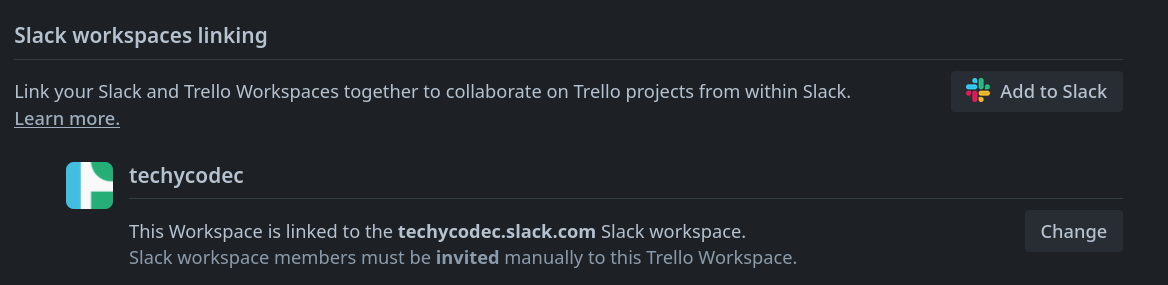
When a Trello workspace admin links their workspace to Slack, the settings page confirms the connection and shows how Slack members can join the Trello workspace:
The integration offers two modes for how Slack members can join the linked Trello workspace:
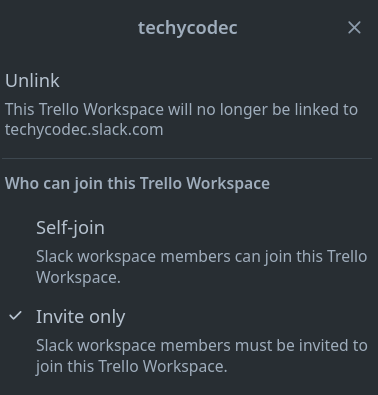
The Permission Model
With "Invite Only" selected, the settings page clearly confirms the restriction is active:

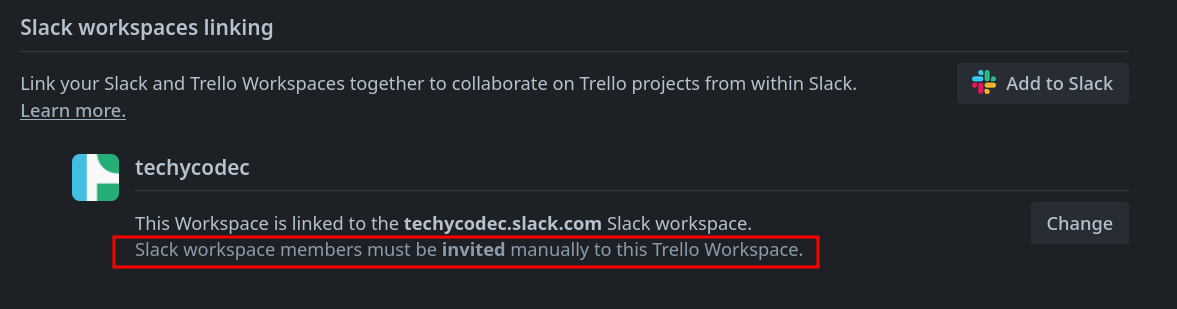
The security contract is explicit: Slack members who are not members of the Trello workspace should only be able to join when a Trello admin manually invites them. There should be no self-service join mechanism.
This creates a cross-application trust boundary. The restriction is defined in Trello (the "Invite Only" setting), but it must be enforced by both Trello and the Slack integration. If either side fails to check the setting, the restriction can be bypassed.
Attack Surface Analysis
The attack surface here is unique because it spans two separate applications — Slack and Trello — that communicate through an integration layer. This creates three places where the "Invite Only" check could (and should) be enforced:
- Trello's web interface — When someone tries to join via Trello directly. This was checked.
- Trello's API — When a direct API request attempts to add a member. This was checked.
- The Slack integration's callback — When the Slack Trello bot processes a "Join" action from a Slack user. This was NOT checked.
This pattern — where the main application enforces a restriction but a third-party integration bypass it — is extremely common. Developers focus on securing the primary UI and API, but forget that integrations create alternative entry points that need the same security checks.
Exploitation — Two Attack Paths
Prerequisites
- Attacker: A member of the Slack workspace (e.g., any employee in the company's Slack)
- Attacker is NOT: A member of the Trello workspace (they haven't been invited)
- Target: The linked Trello workspace with "Invite Only" restriction enabled
Path 1: The Easy Way — Just Click "Join"
This is the simplest attack — the attacker doesn't even need any security tools. They just use Slack normally.
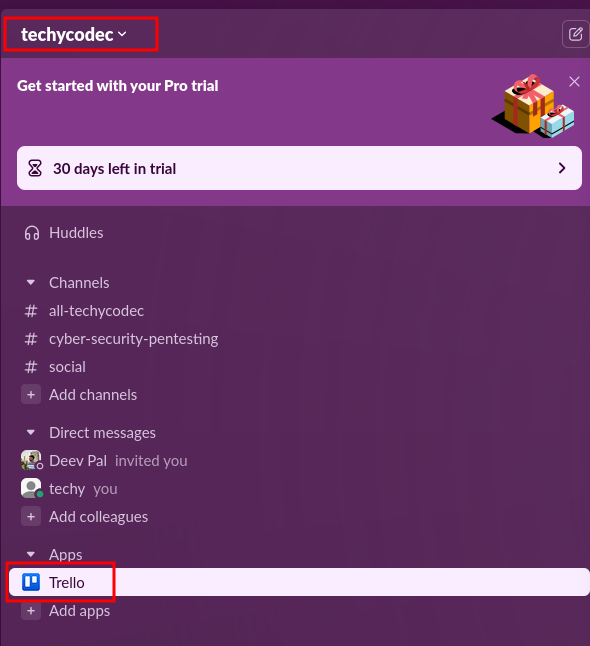
Step 1: The attacker opens their Slack workspace and navigates to the Apps section in the sidebar. They find the Trello integration, which is installed workspace-wide:
Step 2: The Trello bot detects that the attacker's linked Trello account is not a member of the connected Trello workspace. It helpfully offers a "Join" button:
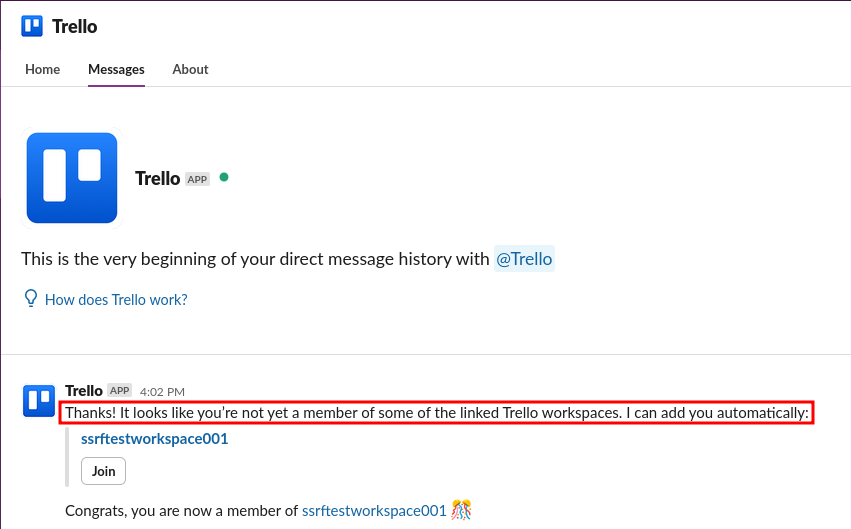
Path 2: The API Way — Replaying the Request
For a more targeted approach (or to automate the attack), the attacker can intercept and replay the API request that the "Join" button sends. Using Burp Suite as a proxy, the attacker captures the exact request:
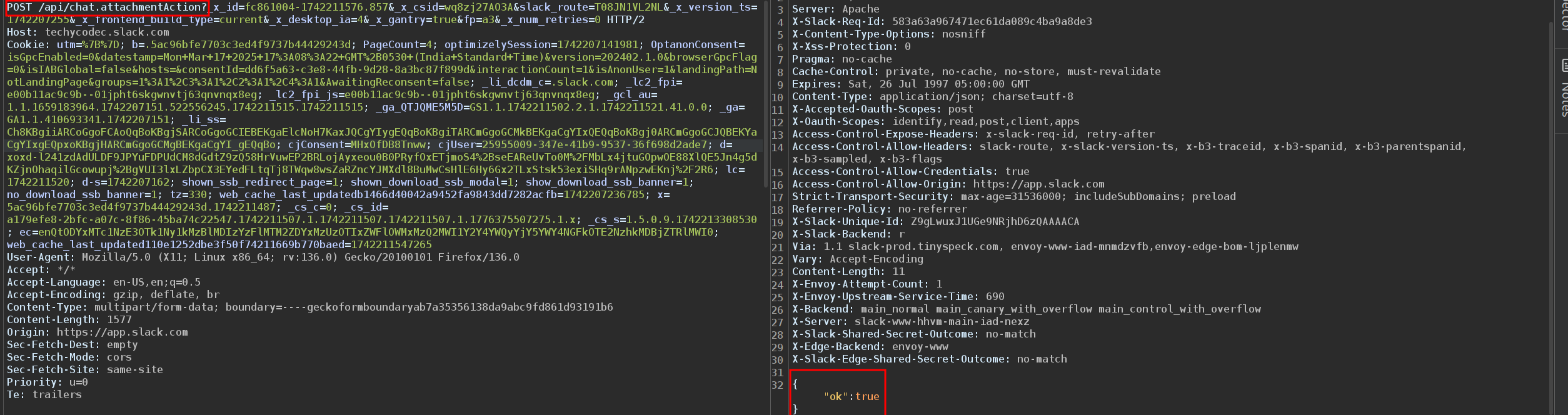
joinTeam callback action with the target Trello workspace ID (idTrelloTeam). The response confirms the action succeeded.The Exploit Request — Dissected
Let's break down what happens when the "Join" button is clicked. The request goes to Slack's API, not Trello's — which is part of why the Trello-side restriction isn't enforced:
POST /api/chat.attachmentAction HTTP/2
Host: techycodec.slack.com
Cookie: <ATTACKER-SLACK-COOKIES>
Content-Type: application/x-www-form-urlencoded

payload={
  "actions": [{
    "name": "joinTeam",
    "value": "{\"idTrelloTeam\":\"TARGET_WORKSPACE_ID\"}"
  }],
  "callback_id": "trello-join-workspace",
  ...
}
Here's what each piece means:
| Field | What it does | Why it matters |
|---|---|---|
POST /api/chat.attachmentAction |
Slack API endpoint for processing button clicks in bot messages | The request goes to Slack's servers, not Trello's directly |
Host: techycodec.slack.com |
The Slack workspace's API hostname | Confirms this is a Slack-side action, processed by Slack's infrastructure |
name: "joinTeam" |
The action to perform — join a Trello team/workspace | This is the core action. Slack forwards this to Trello's integration handler |
idTrelloTeam |
The Trello workspace ID to join | Identifies which Trello workspace the user wants to join |
Cookie |
Attacker's Slack session cookies | The attacker uses their own Slack session — no victim credentials needed |
joinTeam callback from Slack and processed it without checking the "Invite Only" setting. It trusted that if Slack sent the request, it must be allowed — but Slack had no knowledge of Trello's "Invite Only" restriction.Full Attack Chain
1. Admin links Slack workspace to Trello workspace
   └── Sets join method to "Invite Only"
   └── Trello settings confirm: "members must be invited manually"

2. Attacker is a member of the Slack workspace
   └── NOT a member of the Trello workspace
   └── Has a Trello account linked to their Slack profile

3. Attacker opens Trello app in Slack sidebar
   └── Trello bot detects: "you're not a member of linked workspaces"
   └── Bot offers a "Join" button — despite "Invite Only" being set

4. Attacker clicks "Join"
   └── Slack sends: POST /api/chat.attachmentAction
   └── Action: joinTeam with target Trello workspace ID
   └── Trello integration handler processes the join
   └── "Invite Only" check is NOT performed

5. Result: Attacker is now a full workspace member
   └── Access to all workspace boards
   └── Can view, create, and modify cards
   └── Admin receives no alert about the unauthorized join
   └── "Invite Only" setting appears unchanged — admin doesn't know it failed
Root Cause Analysis
The vulnerability exists because the "Invite Only" restriction was enforced by Trello's core application but not by the Slack integration's callback handler. These are two separate code paths maintained by the same team, but the authorization check was only implemented in one of them.
The authorization logic was approximately:
// Trello Web UI / Direct API — join workspace
function joinWorkspace(user, workspaceId) {
    const workspace = getWorkspace(workspaceId);

    if (workspace.slackJoinMethod === "invite_only") {
        if (!user.hasBeenInvited(workspaceId)) {
            return 403; // Blocked ✓
        }
    }

    workspace.addMember(user);
    return 200;
}

// Slack Integration — joinTeam callback
function handleSlackCallback(action) {
    if (action.name === "joinTeam") {
        const user = getTrelloUserFromSlack(action.slackUser);
        const workspaceId = action.value.idTrelloTeam;
        const workspace = getWorkspace(workspaceId);

        // ✗ Missing: check workspace.slackJoinMethod
        // ✗ Missing: check if user has been invited

        workspace.addMember(user); // Directly adds the user
        return 200; // "Congrats, you are now a member!"
    }
}
The first function (used by Trello's web interface and direct API) correctly checks the "Invite Only" setting. The second function (used by the Slack integration) skips the check entirely. This is a classic missing authorization at the integration boundary — the security check exists in the main application but was not replicated in the integration handler.
Impact
CVSS 3.0: AV:N/AC:L/PR:L/UI:N/S:U/C:N/I:H/A:N — 6.5 (Medium)
- Confidentiality: Indirectly high — once the attacker joins, they can access all boards and cards in the workspace, potentially including sensitive business information, client data, and strategic plans
- Integrity: High — the workspace membership boundary is violated; unauthorized users gain full member privileges including the ability to modify cards, lists, and boards
- Availability: None directly
Real-world scenarios:
- Contractor overreach: A company adds contractors to their Slack for communication but restricts Trello access to full-time employees only. Any contractor can bypass this and access all project boards.
- Departmental isolation: A large organization uses one Slack workspace but separate Trello workspaces per department (Engineering, Finance, Legal). An engineer could self-join the Finance Trello workspace and access financial data.
- Former access: An employee who was removed from the Trello workspace (but remains in Slack) can re-join at any time without the admin knowing.
- Silent access: The admin receives no notification that someone self-joined despite the "Invite Only" setting. The breach could go undetected indefinitely.
The core security contract violation: the "Invite Only" setting promises that only explicitly invited users can join the Trello workspace. This promise is broken by the Slack integration, which offers a self-service "Join" button regardless of the setting.
Remediation
Atlassian resolved this by adding the "Invite Only" authorization check to the Slack integration's joinTeam callback handler. The fix ensures that when a Slack user clicks "Join," the integration checks the workspace's join method setting before processing the action:
- If the workspace is set to "Self-Join" — allow the join (existing behavior)
- If the workspace is set to "Invite Only" — reject the join and inform the user they need an admin invitation (new check)
Defensive pattern: When building integrations between applications, every action that crosses the application boundary must carry the full authorization context of the original application. The integration should never assume that because the action came from a trusted partner (Slack), it's automatically authorized. Each action must be independently validated against the target application's (Trello's) access control rules.
Timeline
- 2025-03-17 — Vulnerability discovered and reported via Bugcrowd
- 2025-03-17 — Triaged as P3 (Broken Access Control > Privilege Escalation)
- 2025-08-25 — Fix deployed, vulnerability resolved
- 2025-08-25 — $1,200 bounty awarded
- 2025-08-25 — Disclosure approved
Takeaways for Hunters
- Integrations are goldmines. When two applications are connected, security checks often exist in one but not the other. The integration boundary — where App A talks to App B — is where authorization checks are most likely to be missing. Always test what happens when actions cross that boundary.
- Click every button. This vulnerability was exploitable by literally clicking a "Join" button in Slack. No Burp Suite, no API manipulation, no technical skill required. Sometimes the bug is just… there, in the UI, waiting to be clicked. Don't overthink it — try the obvious thing first.
- Test with the restrictive setting enabled. Many hunters test features with default (permissive) settings. The bugs hide in the restrictive settings. Toggle every permission to its most restrictive option, then test whether the restriction is actually enforced across all entry points.
- Trust boundaries are vulnerability boundaries. Every time data or actions flow between two systems (Slack → Trello, OAuth → App, Webhook → Handler), there's a trust boundary. At each boundary, ask: "Does the receiving system independently verify authorization, or does it trust the sending system?" Blind trust across boundaries is a bug.
- Check for silent failures. In this bug, the admin received no alert that someone self-joined despite "Invite Only." Even if a restriction fails, does the admin know it failed? Silent restriction failures compound the impact because the breach goes undetected.